Layouts
Flexible grid layouts.
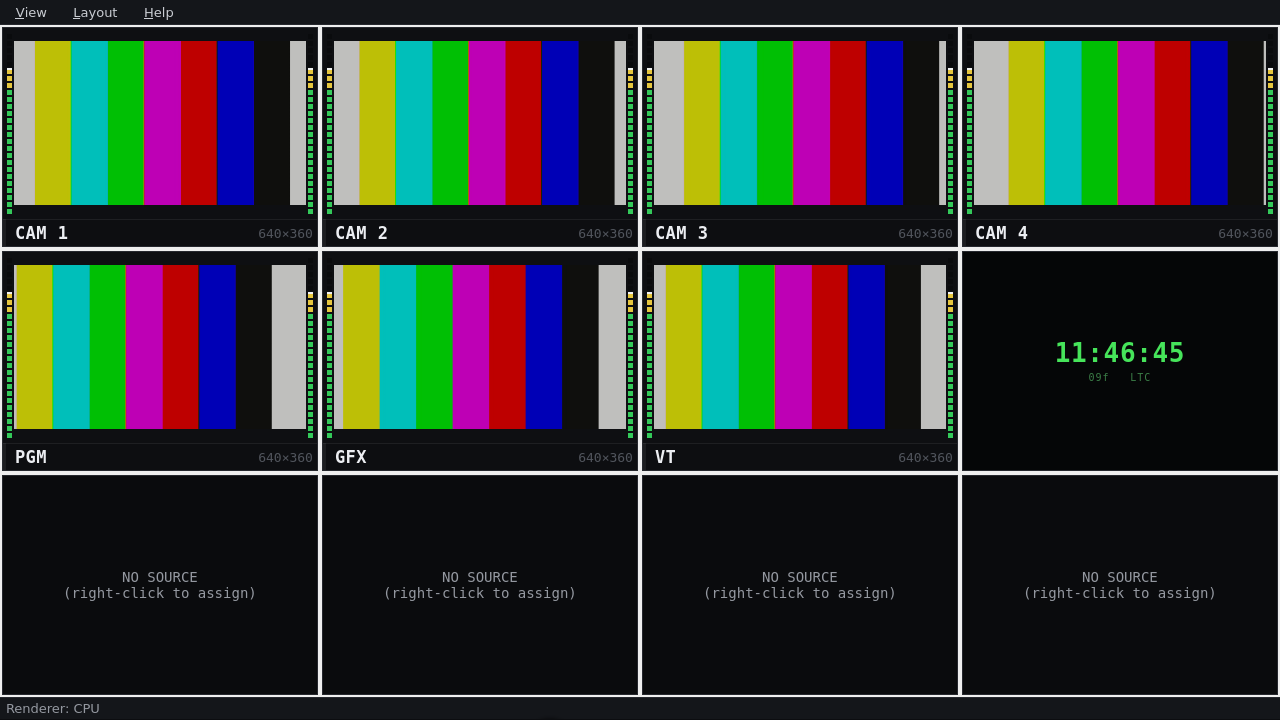
2×2, 3×3, 4×3, 4×4, 5×4. Layout → Edit layout to move and resize. Unused tiles remain available for assignment.
NDI Multiviewer
Layouts, presets, on-screen audio meters, optional multiview NDI output. Windows and Linux. NDI included.
Windows · Linux · 30-day trial · then $5/mo or $49/yr
Features
Layouts
2×2, 3×3, 4×3, 4×4, 5×4. Layout → Edit layout to move and resize. Unused tiles remain available for assignment.
Presets
Save, recall, delete. Layout presets persist after you close the application. The layout also auto-saves as you left it.
Audio
Green / amber / red meters on the tile, with peak-hold. View → Audio meters. No sound through the app.
Output
View → Output. Named “computer (Multiviewer)”. Always 1920×1080, 25 or 50 fps. Off until you turn it on.
Sources
Clock tile (HH:MM:SS). Custom labels. Add by IP if discovery misses. Full-bandwidth NDI, no compressed/HX.
Renderer
Proxy by default, or full resolution. Optional half-rate on 50p/60p. Fullscreen F11.
Pricing
Multiviewer · Monthly
After the 30-day in-app trial. Cancel anytime in the billing portal — access and your license keep working until the end of the paid period. No refunds.
Multiviewer · Annual
Same Multiviewer. Billed yearly. Cancel in the billing portal. No refunds.
Payments are processed by Stripe. No account is required on this site. Manage or cancel in the billing portal.
Install
Windows Setup, or Linux AppImage / .deb. NDI included. The NDI 6 runtime is included in every Multiviewer download — you do not need a separate NDI install.
On Linux, install avahi-daemon for automatic mDNS discovery (preinstalled on most desktops). Without it, add sources by IP in the app (View → Discovery).
Primary download. Run the Setup installer.
File: NDI_Multiviewer_Setup_1.2.1_x64.exe · NDI included · 30-day trial in the app
Windows may show SmartScreen or Defender warnings (“Windows protected your PC”, unknown publisher, or that the app could be dangerous). That can happen with a new installer. Choose More info, then Run anyway (wording varies by Windows version). The download from lumengrid.shop is the Multiviewer Setup we publish.
Press Download AppImage. One file for most Linux 64-bit desktops. NDI is already included.
Right-click the file → Properties → allow executing as a program.
Double-click the AppImage.
File: NDI_Multiviewer-1.2.1-x86_64.AppImage · NDI included · 30-day trial in the app
Fedora, Arch, and most other Linux desktops.
Packaged install. NDI is included in the .deb.
File: ndi-multiviewer_1.2.1_amd64.deb
Tip: Double-click may only open a folder. Do not rely on that. Use Software Install or the terminal command below.
Find the downloaded .deb. Right-click → Open With… → Software Install (or Ubuntu Software). Follow the prompts.
Open Terminal, go to your Downloads folder, then run:
cd ~/Downloads
sudo apt install ./ndi-multiviewer_1.2.1_amd64.deb
apt installs any missing pieces automatically.
Optional reference only: NDI’s own SDK packages at ndi.video/for-developers are not required — Multiviewer already ships the NDI runtime.
Install, license, and common issues.
Download PDF (49 KB)
NDI_Multiviewer_Setup_1.2.1_x64.exe and run the Setup installer. NDI is included — no separate NDI Tools install is required for Multiviewer.noexec, copy it to your home folder. Optional terminal: chmod +x the AppImage.avahi-daemon is running (systemctl status avahi-daemon) and that sender and receiver are on the same subnet. You can always add sources by IP (View → Discovery).sudo apt install ./ndi-multiviewer_1.2.1_amd64.deb (keep the ./) so apt pulls in any missing pieces.Optional AppImage terminal:
chmod +x NDI_Multiviewer-1.2.1-x86_64.AppImage
./NDI_Multiviewer-1.2.1-x86_64.AppImage